
tl;dr how to invite users to incident Slack channels created by Datadog
- Use an incident trigger and reference it via Incident Notifications
- When getting the Slack channel use
{{ Source.incident.id }} - When inviting users, the channel is
${ Steps.Get_incident_Slack_channel.channel_name }
If you use both Datadog and Slack, I hope you have explored how Datadog can create incident channels. At work, we have found this incredibly useful and allowed us to replace a custom workflow.
Recently our SRE team had refactored some of the chatops tools that we used through Slack commands to do things like restart services and page people/teams. We needed their newly created bot automatically added to newly created incident channels. There are many ways to accomplish this, so really...how hard could it be? Well...I'm writing this post, so it was non-trivial.
This is specific to using Datadog Workflow Automation and some of the bumps in the road I ran into (over?). The first bump, which is technically in the documentation, but I didn't understand it when I read it, was to trigger off incident creation automatically you need to use the incident notifications to do the triggering. I was under the impression that "trigger automatically" just meant that it would trigger, but the language is actually "trigger automatically via". My bad. Do not that in the notification settings there is an option for Declared or Declared or incident attributes are updated and for our purposes we chose only Declared as we don't need to invite the same user again.
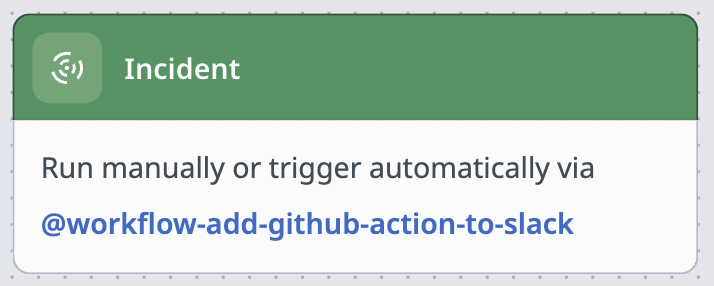
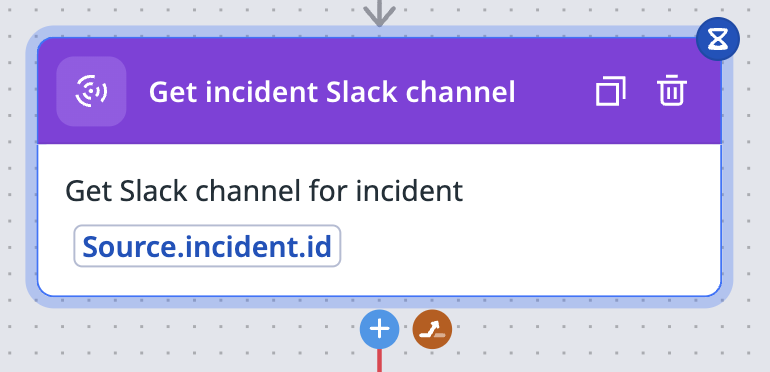
So, now that we know how to trigger the incident via the notifications settings in Incidents, the next step was to get the Slack channel, which has a handy action named Get incident Slack channel. Claude and ChatGPT were of little help here, giving me nothing by wrong answers. It was a Datadog employee in the public Slack that gave me the right incantation of {{Source.incident.id}}. Once you see it, it's obvious, but I had a heck of time getting there.
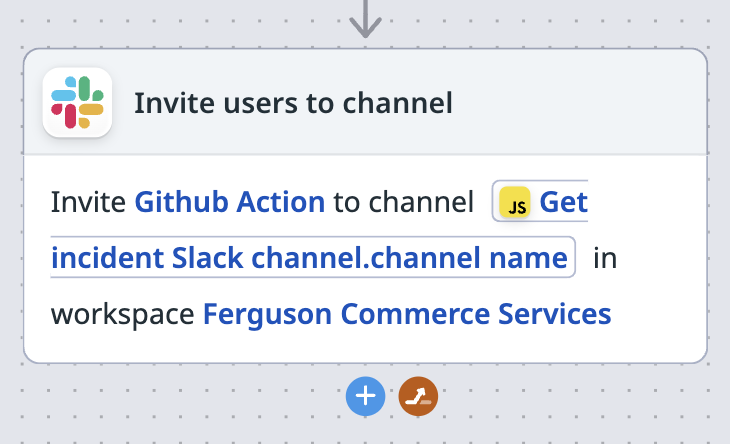
I didn't get stuck on the next step, but since I'm documenting all this, it was to use the Invite users to channel action. The only thing that might be confusing is the channel is ${ Steps.Get_incident_Slack_channel.channel_name }. The user and workspace will be unique to your setup.
Again, once you see it all, it's not complicated and super easy, barely an inconvenience. If you're here though, I hope this helps.
Side rant: I feel like this was harder because of No Code interface and probably because for reasons I don't fully understand I wasn't able to get to the Datadog docs that require authentication. I have no doubt that the answers to my problems are available. Also, why do docs require authentication?