A photo backup vortex? What the heck is that?
I'm so glad you asked! Everybody should backup their important digital files. Luckily there are so many easy to use serives that it's trivial and inexpensive to backup everything, thus freeing you from having to decide what's "worthy" of being backed up. The default should be everything. But, what if some things were so important than you wanted more than one backup but still wanted everything to just get sucked into the "vortex" and off it went to however many backup systems you wanted? I consider my photos to be very, very important and I want them backed in multiple places.
This is the story of my photo backup vortex.
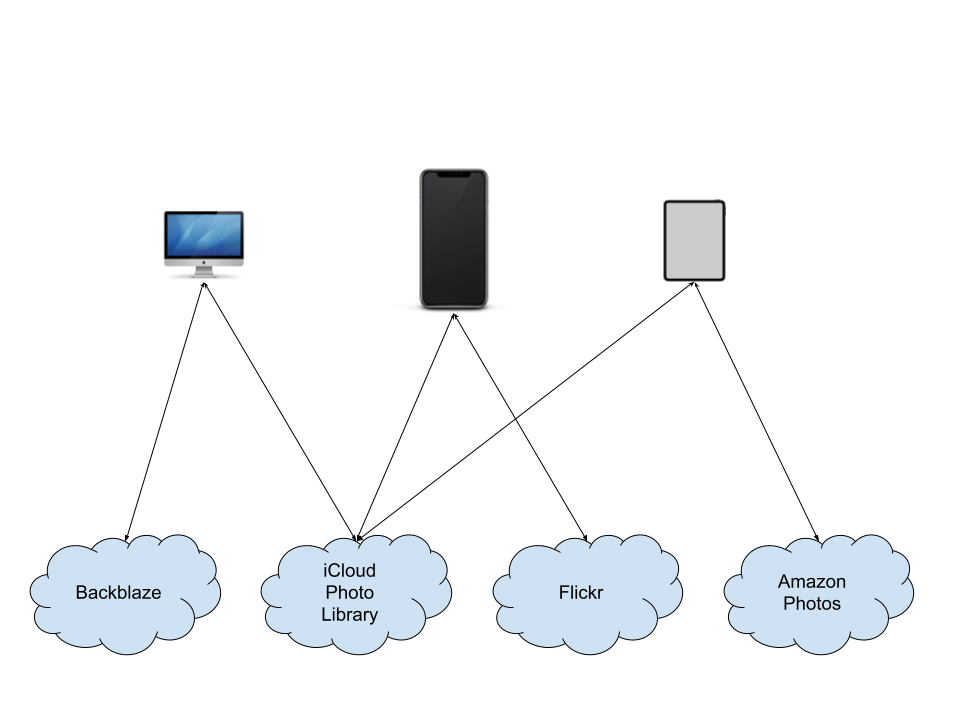
It starts with my iPhone. This is my camera at this point. I don't have any other DSLR or digital "point and shoot" (at least with a working battery) to take photos with any longer. I guess the best camera you have really is the one you have with you.
- Photos and videos taken on my iPhone get uploaded to iCloud Photo Library
- My iMac downloads full size copies of each photo and video
- My iMac is continually backing up to Backblaze
- My iPad is setup with Amazon Photos (free with Prime) and is continually uploading photos
- My iPhone is also set to upload to Flickr but...it's quite unreliable.
The key thing is that the vortex just sucks photos in and I don't have to do a thing. There's also local Time Machine backups on my iMac, but I just focused on add "offsite" cloud services. It's great to have local backups, but you really need to also have backups that don't live in the same house as your computer.
I don't really test doing a full restore from backup, or at least very often. Any time I get a new device (iPhone, iPad, Mac) it gets access to the canonical iCloud Photo Library and life is good. Backblaze would be the best restore to test out as it has a full copy of the library.
If you're a Google/Android person, you should just replace iCloud Photo Library with Google Photos.

